Newwind 5.0 - Folia
2026-09-01
Newwind Folia
Newwind has been fully ported to Folia.
- Minecraft servers need to do a lot of computation for ticking entities, handling player actions, loading chunks and more.
- Normally, most of this happens on a single CPU core, creating a hard limit on how many players and entities a server can handle.
- Folia allows different parts of the world to tick across multiple CPU cores, giving Newwind much greater headroom for players, mobs and farms.
- There are no loading screens/borders/sub-servers required like traditional multi-server setups. Newwind remains the same single world.
We are still experimenting with the limits of Folia on Newwind, but here are the current changes since 5.0's release:
Increased Server Capacity
- All Mob limits have been doubled.
- The maximum amount of player slots have been tripled.
- Mob spawning rates and per-player mob caps have been increased.
Increased Distances
- Entity view range has been increased.
- Mobs can now tick more often and further away from players.
- Lapis players now receive +4 chunks of view distance.
- Simulation distance (the distance at which chunks can tick) has been increased for everyone.
Performance Improvements
- Chunks can now load considerably faster.
- End chunk generation speed has been drastically increased.
- Network compression has been increased to reduce lag.
- The server now ticks much more smoothly without any micro-stuttering/lag spikes.
Vanilla Mechanics
Many cut-backs that Newwind needed for performance are no longer necessary and have been removed.
- Items now merge at the same range as vanilla.
- Hoppers now tick as often as in vanilla.
- Entity collisions are now the same as vanilla.
- Grass, farmland, and mob spawners now tick at the same rate as vanilla.
- Newwind has switched back to vanilla redstone (instead of Alternate Current).
Existing Farms
To avoid breaking existing farms, the current mob spawning radius of 48 blocks will remain unchanged for now.
Quick Actions
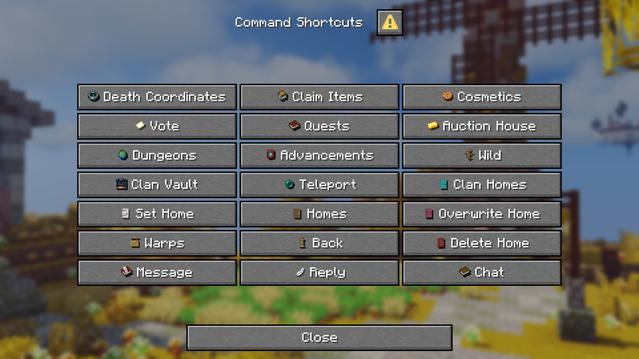
We have added a new Quick Actions menu.
- Press G to open Quick Actions at any time.
- Quickly access common features, similar to a Command Stone.
- Includes Homes, Warps, Teleporting, Chat, Messages, Quests, Voting, Cosmetics, Clan features and more.
- Actions such as Set Home, Message, Reply and Chat use quick interactive menus when needed.
- Quick Actions use the same underlying shortcuts as the Command Stone, so both menus behave consistently.